Avatar Parameters
The AvatarParameters allow a user to create Parameters to interact with their Avatar's Custom Animators.
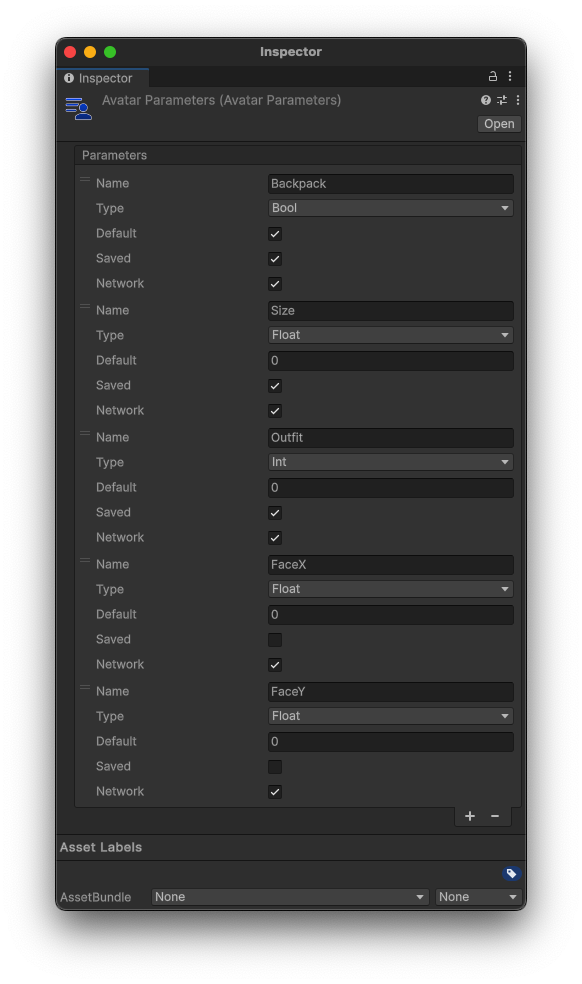
Creating a Parameters Sheet
To create a Parameters Sheet, right click anywhere in your Project folder, then select Create > Hypernex > Avatars > Parameters, and you will see your newly created Avatar Parameters Sheet.
Create a Parameter
To create a parameter, click the + button at the bottom of the window. From there you can configure your parameter.
Parameter Options
Name
The name of the parameter that your Animators contain.
The parameter name is case-sensitive!
Type
The type of Parameter. Can be any of the following:
- Bool
trueorfalse
- Float
- Floating point number
- Int
- Whole number/Integer
Default
The default value of the parameter. This will match your selected type.
Saved
If the parameter should be saved when creating a profile.
Network
Whether or not to sync the parameter over the network.
Try to reduce the number of Networked parameters, as having too many may degrade your experience!